The Anatomy of Modern Web Recon: From JavaScript Bundles to Cloud Misconfigurations
Modern web applications are built faster than ever. With AI-assisted coding tools and managed cloud platforms (AWS, Firebase, Supabase, Vercel), developers can ship a full-stack product in a single weekend. However, speed often comes at the expense of security hygiene. Developers frequently leave default configurations untouched, assume "it works" means "it's secure," and unintentionally expose critical infrastructure to the public internet.
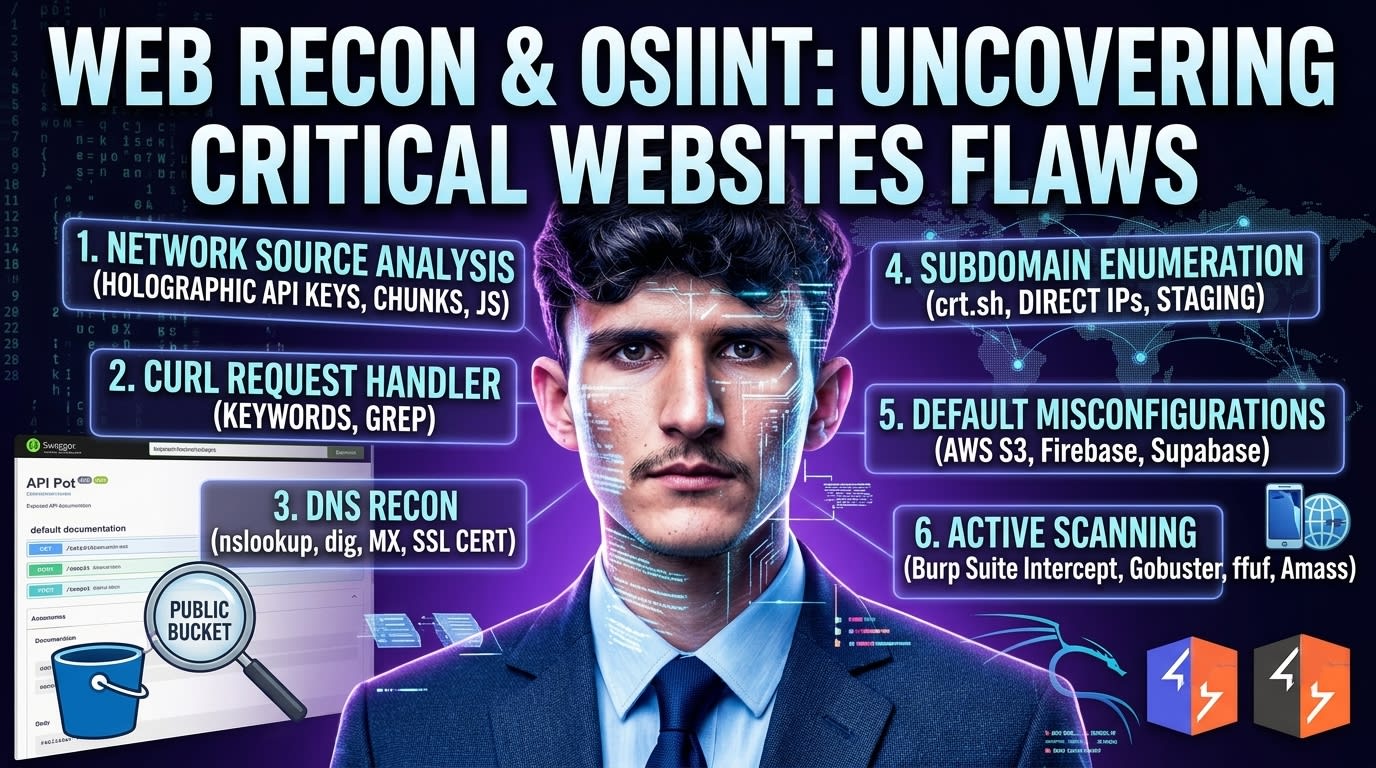
As a backend software engineer with a deep focus on web application security, I have developed a structured, step-by-step Web Reconnaissance & OSINT Methodology. Rather than immediately firing noisy automated scanners, my workflow prioritizes passive intelligence gathering, client-side bundle analysis, DNS/certificate forensics, and surgical curl requests before transitioning into active testing on authorized targets.
Here is the exact mental model and technical workflow I use to analyze web architectures—and how developers can harden their applications against these exact techniques.
Ethical Disclaimer & Rules of Engagement
Important: Every technique discussed in this article is strictly intended for authorized security assessments, bug bounty programs with explicit scope, CTF environments, and auditing your own infrastructure. Passive OSINT relies on publicly indexed data, whereas active enumeration (gobuster, ffuf, Burp Suite interception) must only be performed against assets you own or have written permission to test.
Phase 1: Client-Side & JavaScript Bundle Forensics (The Browser Layer)
Before touching a single Kali Linux terminal tool, the browser itself is the richest source of passive intelligence. Modern Single Page Applications (SPAs) built with React, Next.js, or Vue ship massive amounts of logic directly to the client.
1. Inspecting Page Source & The Network Tab
My first step on any web application is opening DevTools (F12 -> Network & Sources tabs) and reloading the page. Even without interacting with the UI, an application immediately reveals:
- Internal API base URLs (e.g.,
api-staging.company.com, internal microservice paths)
- Third-party integrations (Stripe, Moyasar, Algolia, Sentry, Mixpanel)
- Authentication header patterns (
Bearer, custom X-API-Key headers)
- Hardcoded configuration objects embedded in
window.__INITIAL_STATE__ or <script> tags
2. Downloading & Grepping JS Bundles with curl
Browser DevTools are great for quick inspection, but serious analysis happens in the terminal. Modern bundlers (Webpack, Vite) split code into main.js, vendor.js, and numbered chunks (142.chunk.js). Developers frequently leave secrets, internal endpoints, and feature flags inside these files.
I extract the script URLs and pull them locally using curl to run fast regex and keyword searches:
12345678910111213
curl -s https://target-app.com | grep -Eo 'src="[^"]+\.js"' | cut -d'"' -f2 > js_urls.txt
mkdir -p recon_js && cd recon_js
while read url; do
[[ $url == /* ]] && url="https://target-app.com$url"
curl -sO "$url"
done < ../js_urls.txt
grep -rnEi "(api_key|apikey|secret|token|authorization|firebase|supabase|amazonaws|s3\.|internal|staging|admin|graphql|/api/v)" .
What this frequently uncovers:
- Exposed Firebase
apiKey and databaseURL configurations
- Supabase
anon keys paired with misconfigured Row-Level Security (RLS)
- AWS S3 bucket names and Cognito Identity Pool IDs
- Unlinked admin routes (e.g.,
/dashboard/super-admin) that rely solely on frontend UI hiding rather than backend RBAC
Phase 2: DNS Forensics, Infrastructure Mapping & Certificate Transparency
 Network Infrastructure and Server Cables
Photo by Taylor Vick on Unsplash
If client-side analysis doesn't reveal the full picture—or when I want to understand the underlying hosting architecture—I pivot to DNS and SSL/TLS forensics.
1. Resolving Records with nslookup and dig
Understanding how traffic is routed tells you immediately whether a target sits behind a Web Application Firewall (WAF) like Cloudflare/CloudFront or directly exposes its origin server.
1234567
dig +short A target-app.com
nslookup target-app.com
dig +short MX target-app.com
dig +short TXT target-app.com
- Why MX & TXT records matter: TXT records (SPF, DKIM, domain verification strings) reveal the exact SaaS ecosystem an organization uses—such as Google Workspace, Microsoft 365, SendGrid, Mailgun, Atlassian, or Zendesk. Sometimes, an
include: directive in an SPF record leaks an unproxied origin IP range.
2. Subdomain Enumeration via Certificate Transparency (crt.sh) & Amass
Every time an organization provisions an SSL/TLS certificate via Let's Encrypt or a commercial CA, it is logged publicly in Certificate Transparency (CT) logs. Even if a subdomain isn't linked anywhere on the main website, its certificate gives it away.
I query crt.sh via curl and jq for instant passive subdomain discovery, alongside OWASP Amass on Kali Linux:
12345
curl -s "https://crt.sh/?q=%25.target-app.com&output=json" | jq -r '.[].name_value' | sed 's/\*\.//g' | sort -u > subdomains.txt
amass enum -passive -d target-app.com -o amass_subs.txt
What I look for in the subdomain list:
- Origin IP Leaks: While
target-app.com might be protected by Cloudflare, subdomains like dev.target-app.com, staging.target-app.com, direct.target-app.com, or cpanel.target-app.com often point directly to the raw VPS IP address, bypassing the WAF completely.
- Forgotten Staging Environments: Staging servers frequently run older codebases with debug mode enabled, verbose stack traces, and weaker authentication controls.
Phase 3: Technology Fingerprinting & Exposed API Documentation
Once I have a clean list of live hosts and subdomains, I fingerprint the backend technology stack (whatweb, HTTP response headers) and check for exposed developer documentation.
Backend frameworks love to generate interactive API documentation out of the box. In development, this is a productivity boost; in production, leaving it publicly accessible is a massive security blind spot.
12345678
whatweb -a 3 https://api.target-app.com
for path in "/swagger-ui.html" "/swagger-ui/index.html" "/v3/api-docs" "/v2/api-docs" "/api/docs" "/redoc" "/graphql" "/actuator/health" "/actuator/env"; do
status=$(curl -s -o /dev/null -w "%{http_code}" "https://api.target-app.com$path")
echo "$path -> HTTP $status"
done
Why this is critical:
When a developer leaves /v3/api-docs or /swagger-ui.html open in production, an attacker doesn't even need to guess endpoints. They get a complete blueprint of every HTTP method (GET, POST, PUT, DELETE), expected JSON payloads, required headers, and internal admin endpoints. Similarly, exposed Spring Boot /actuator endpoints can leak environment variables, heap dumps, and active database metrics.
Phase 4: The "AI-Era" Goldmine — Default Cloud Misconfigurations
 Cloud Computing and Data Security Concept
Photo by NASA on Unsplash
One of the biggest trends I observe in modern web applications is AI-accelerated misconfiguration. Developers use AI coding assistants to wire up authentication, file uploads, and database queries in minutes—and the moment the feature works in the browser, they deploy it without reviewing cloud security policies.
When inspecting JS bundles and network requests, I pay close attention to three major cloud ecosystems:
- AWS S3 Buckets:
- Developers often set bucket ACLs or bucket policies to
PublicRead so images load easily on the frontend, accidentally enabling ListBucket permissions (s3:ListBucket).
- Visiting
https://<bucket-name>.s3.amazonaws.com/ returns an XML directory listing of every uploaded file—including private invoices, user KYC documents, and database backups.
- Firebase Realtime Database & Firestore:
- During prototyping, developers frequently set security rules to
allow read, write: if true; and forget to lock them down before launch.
- Appending
/.json to an exposed Firebase Realtime Database URL (https://<project-id>.firebaseio.com/.json) immediately tests whether the entire database is readable without authentication.
- Supabase (PostgreSQL + PostgREST):
- Supabase exposes a REST API directly over PostgreSQL using an
anon public key embedded in the frontend. Security relies entirely on Row-Level Security (RLS) policies.
- If a developer creates a new table and forgets to toggle "Enable RLS", anyone with the public
anon key can query, insert, or dump the entire table using a single curl request against /rest/v1/<table_name>.
Phase 5: The Secret Weapon — Surgical curl Requests Before Heavy Scanners
Many beginners make the mistake of immediately pointing heavy brute-forcing tools (gobuster, ffuf) or automated vulnerability scanners at a target. Automated scanners generate massive noise, trigger WAF rate limits, and completely miss business logic flaws.
In my experience, hand-crafted curl requests are the single sharpest weapon in web security analysis.
By reading the frontend JavaScript and watching normal API behavior, you can form a hypothesis and test how the backend actually validates input:
1. Testing IDOR (Insecure Direct Object References)
If the frontend fetches your profile via GET /api/v1/users/1042, what happens when you manually send a curl request for 1041 using your valid JWT token?
123
curl -i -X GET "https://api.target-app.com/api/v1/users/1041" \
  -H "Authorization: Bearer <YOUR_JWT_TOKEN>" \
  -H "Accept: application/json"
2. Testing Mass Assignment & Privilege Escalation
When updating a user profile (PATCH /api/v1/users/me), the UI might only send {"name": "Shahis"}. By inspecting the Swagger schema or JS bundle, you might notice the user model also has a role or isVerified field. Testing whether the backend blindly binds incoming JSON DTOs:
1234
curl -i -X PATCH "https://api.target-app.com/api/v1/users/me" \
  -H "Authorization: Bearer <YOUR_JWT_TOKEN>" \
  -H "Content-Type: application/json" \
  -d '{"name": "Shahis", "role": "ADMIN"}'
3. Testing HTTP Method Tampering & Header Spoofing
Sometimes GET /api/v1/admin/users returns 403 Forbidden, while HEAD, OPTIONS, or adding internal proxy headers (X-Forwarded-For: 127.0.0.1, X-Original-URL: /admin) reveals improper access control rules on the reverse proxy.
Phase 6: Active Enumeration & Traffic Interception (Authorized Scope Only)
 Code Analysis and Penetration Testing Screen
Photo by Arnold Francisca on Unsplash
Once passive OSINT and manual curl probing have mapped the architecture—and strictly within authorized testing environments—I transition to active fuzzing and proxy interception using Kali Linux tools and Burp Suite.
1. Directory & Parameter Fuzzing with ffuf and gobuster
When documentation isn't publicly exposed, fast fuzzers help discover hidden endpoints, backup files (.env.bak, config.php.old, dump.sql), and undocumented API parameters.
123456789
gobuster dir -u https://authorized-target.com \
-w /usr/share/seclists/Discovery/Web-Content/raft-medium-directories.txt \
-x php,json,bak,env,sql,zip -t 40
ffuf -u https://authorized-target.com/api/v1/FUZZ \
-w /usr/share/seclists/Discovery/Web-Content/api/api-endpoints.txt \
-mc 200,201,204,301,302,401,403
2. Deep Session & Workflow Interception with Burp Suite
While curl is unbeatable for precision, Burp Suite shines when testing multi-step stateful workflows (such as e-commerce checkouts, OAuth2 callback flows, and payment webhook verifications):
- Proxy & Repeater: Intercepting checkout requests to test whether item prices, quantities, or currency codes can be manipulated client-side before payment gateway initialization.
- Intruder: Testing rate-limiting on OTP verification endpoints, password reset tokens, and coupon code redemption.
- JWT Analysis: Inspecting token signatures, checking for
alg: none vulnerabilities, weak HMAC secrets, or missing expiration (exp) validation.
Summary: How Developers Can Defend Against This Workflow
Understanding offensive reconnaissance makes you a significantly better backend engineer. If you are building and deploying modern web applications, apply this defensive checklist before going live:
- Never Trust the Frontend: Assume every line of your React/Vue/Next.js bundle will be downloaded, beautified, and grepped. Never store secret keys in frontend
.env files (VITE_* / NEXT_PUBLIC_* are completely public).
- Disable Debug & Docs in Production: Explicitly disable Swagger/OpenAPI (
springdoc.api-docs.enabled=false) and Spring Boot Actuator endpoints in production profiles, or lock them behind an internal VPN/IP allowlist.
- Lock Down Cloud Defaults: Enable Row-Level Security (RLS) on every Supabase table, enforce strict Firebase Security Rules, and block public
s3:ListBucket permissions on AWS S3.
- Enforce Object-Level Authorization: Validate ownership on every single database query (
WHERE id = :resourceId AND user_id = :authenticatedUserId) to eliminate IDOR vulnerabilities.
- Hide Origin IPs: Configure your firewall (UFW / AWS Security Groups) so your backend servers only accept HTTP/HTTPS traffic from your CDN/WAF IP ranges (e.g., Cloudflare IPs), preventing direct-to-IP bypasses.
Written by Muhammad Shahis Khan — Backend Software Engineer & Web Security Researcher. Connect with me on GitHub or LinkedIn.
Comments 0
Guest comments are reviewed before they appear.
Loading comments…